Posts

Lightning Spinner : Toast for LWC and Aura

Image
Lightning Spinner : Aura Component Aura Component : HTML Aura Component : CSS .THIS.spinner{ position: relative; display: inline-block; width: 51px; vertical-align: middle; white-space: nowrap; } Lightning Spinner : Lightning Web Component LWC : Template (HTML) Lightning Web Component : JS import { LightningElement, track } from 'lwc'; export default class Spinner extends LightningElement { @track loading = true; } Lightning Web Component : CSS .spinner{ position: relative; display: inline-block; width: 51px; vertical-align: middle; white-space: nowrap; } Note : You can hide spinner from JS via set loading=false attribute in both framework. Lightning Toast: Aura Component Just needed Call Standard Event to show : $A.get("e.force:showToast"); Aura Component : HTML Aura Comp...

Lightning Datatable for LWC and Aura

Image
Lightning DataTable : Aura Component LightningDataTableController(Apex Controller ) public class LightningDataTableController{ @AuraEnabled public static List<Contact> fetchAccountContacts(String accountId) { List<Contact> lstContact=new List<Contact>(); lstContact=[select id ,Name,Email,Phone from contact where accountid=:accountId]; return lstContact; } } LightningDataTable.cmp (Component) <aura:component controller="LightningDataTableController" implements="force:hasRecordId,flexipage:availableForAllPageTypes,force:lightningQuickActionWithoutHeader" access="global"> <aura:handler name="init" value="{!this}" action="{!c.doInit}" /> <aura:attribute name="data" type="Object"/> <aura:attribute name="columns" type="List" default="[{label: 'Name', fieldName: ...

Lightning Web Component and Lightning-Aura Component : Salesforce

Image
Lightning Web Component and Lightning-Aura Component : Salesforce Code Cheat Sheet for both Framework with Comparison 1. Component Bundles Lightning-Aura Component .comp : Markup or HTML Controller.Js : Client Side Controller Helper.Js : Client Side Util or Helper Controller Render.Js : Client Side Render Controller .css : CSS Resource for HTML .auradoc : Aura Documentation .design : Design Parameter for Builder .SVG : SVG Resource for Component Lightning Web Component .html : Markup or HTML Controller.Js : Client Side Controller .css : CSS Resource for HTML meta.xml : Design Parameter for Builder 2. JavaScript properties or Variables Lightning-Aura Component Lightning Web Component import { LightningElement, api, track } from 'lwc'; export default class fetchRecords extends LightningElement { @api recordId; @track sobject; } 3. Logical Operators Lightning-Aura Component //isLoading is a boolean attribute in Component Ligh...

Calling Apex method from a Custom Button and Submit to Approval Process

Image
To call Apex method from a Custom Button and Submit to Approval Process : Salesforce 1. Create a custom button {!REQUIRESCRIPT("/soap/ajax/15.0/connection.js")} {!REQUIRESCRIPT("/soap/ajax/15.0/apex.js")} var approval = confirm("Are you sure want to send it for approval process?"); if(approval == true) { sforce.apex.execute("ApprovalSubmit","sentToApproval",{recordId:"{!Interviewer__c.Id}"}); alert("Set Record for Approval"); } 2. Create a apex class : global class ApprovalSubmit{ webservice static void sentToApproval(Id recordId) { Approval.ProcessSubmitRequest req1 = new Approval.ProcessSubmitRequest(); req1.setComments('Submitted for Approval'); req1.setObjectId(recordId); Approval.ProcessResult res = Approval.Process(req1); } } Happy Sharing... Everyone has their own favourites, so p...

How to Build a Basic Salesforce REST API (With Test Class) and Test with POSTMAN

Image
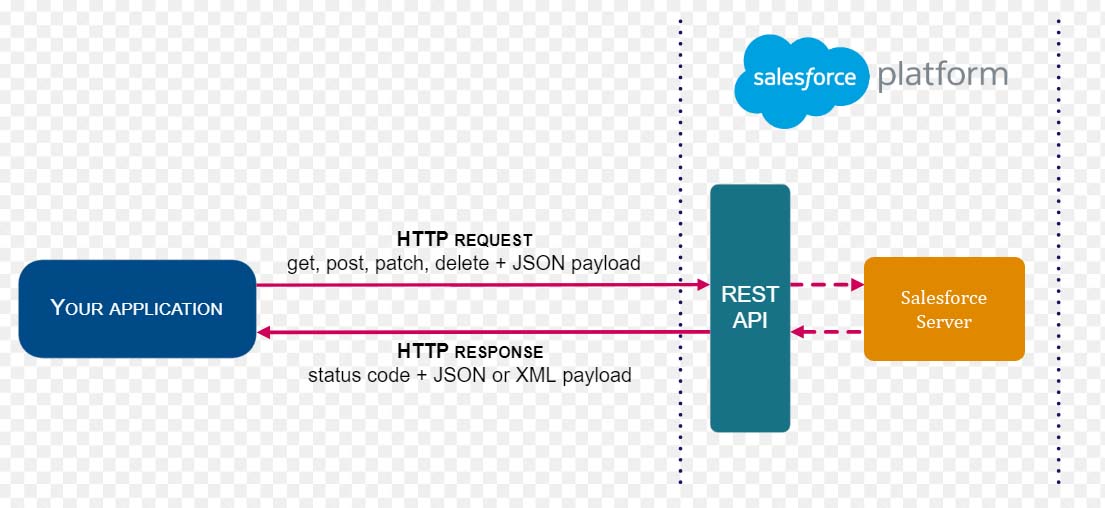
Salesforce : Creating Anonymous Apex REST APIs with Force.com The Force.com REST API lets you integration with Force.com applications using standard HTTP methods. This API provides a way to expose the data you have within your Force.com application to external applications – both mobile and non-mobile. A few useful bits of information related to these REST APIs: This sample Code you how to implement a simple REST API to fetch Account in Apex class: @RestResource(urlMapping='/Account/*') global with sharing class MyRestResource { @HttpGet global static Account doGet() { RestRequest req = RestContext.request; RestResponse res = RestContext.response; String accountId = req.requestURI.substring(req.requestURI.lastIndexOf('/')+1); Account result = [SELECT Id, Name, Phone, Website FROM Account WHERE Id = :accountId]; return result; } } Call to REST Client (with Curl) : curl -H "Authorization: Bearer sessi...

Creating Web-services in Salesforce

Image
Salesforce : Calling from another Salesforce System Recently I had a requirement where one of my client wanted to interact with their Salesforce org to insert some information in their org from another salesforce, and they wanted it through web-services. This post will cover what I have learned in regards to web-services with this requirement and what steps I had taken for this. Target Org : SetUp Creating Web Services in Force.com is as simple as creating an Apex class. Here is an Example: global class WebServiceContact { webservice static string createContact(String contactLastName) { try { Contact c = new Contact(lastName = contactLastName); insert c; return c.id; }catch(System.Exception e) { System.debug('Callout error: '+ e); return 'Server Error...'; } } } Generate and Download WSDLs with below steps To get your org-specific WSDLs see below Steps. 1. Go to A...

Salesforce : Custom Related List

Image
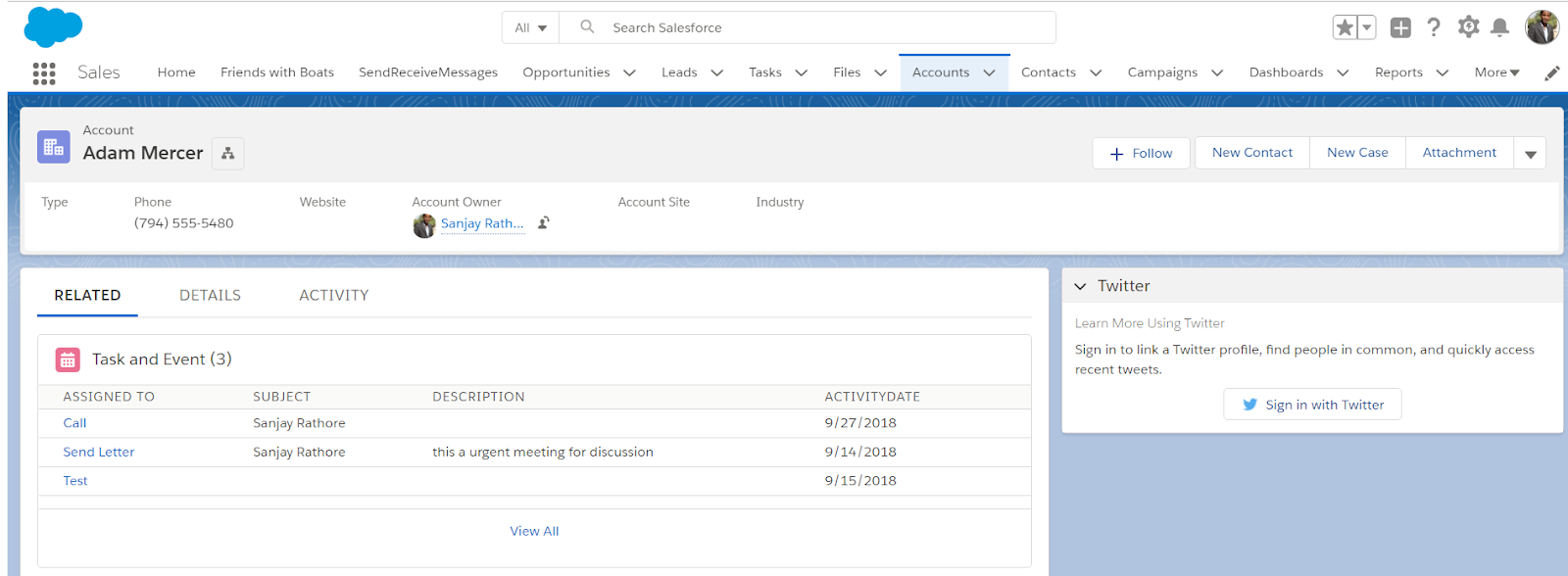
Salesforce : Custom Related List LightningTaskAndEventController (Apex Controller ) public class LightningTaskAndEventController { @AuraEnabled public static List<Contact> fetchTaskandEvent(String contactId) { List<Contact> lstContact=new List<Contact>(); lstContact=[select id ,Name,Email,(select WhatID,Owner.Name,ActivityDate,Description,id,subject from tasks order by ActivityDate desc limit 5) from contact where id=:contactId]; return lstContact; } } LightningTaskAndEvent.cmp (Component) <aura:component controller="LightningTaskAndEventController" implements="force:appHostable,flexipage:availableForAllPageTypes,flexipage:availableForRecordHome,flexipage:availableForAllPageTypes,flexipage:availableForRecordHome,force:hasRecordId,forceCommunity:availableForAllPageTypes,force:lightningQuickAction" access="global" > <aura:handler name="init" value=...